Ebode IP Vision 58 Manuale Utente Pagina 15

  • Scaricare
  • Aggiungi ai miei manuali
  • Stampa
  • Pagina
    / 77
  • Indice
  • SEGNALIBRI
  • Valutato. / 5. Basato su recensioni clienti
Vedere la pagina 14
Manual version 1 – March 2012 15 IP Vision 58
2.1.1.4 Refresh Camera List
Refresh camera list manually.
2.1.1.5 Flush Arp Buffer
When cable network and wireless network of the device are fixed IP address .There is a problem you may
encounter is can search the camera IP but can’t open the camera web page .you may try to use Flush Arp
Buffer.
2.1.1.6 About IP Camera Tool
Check the IP Camera Tool Version and IP Camera ActiveX Control Version here.
2.2 Camera Login
You can access the camera through IP Camera Tool or IE, Firefox, Safari, Google Chrome or other standard
browser directly.
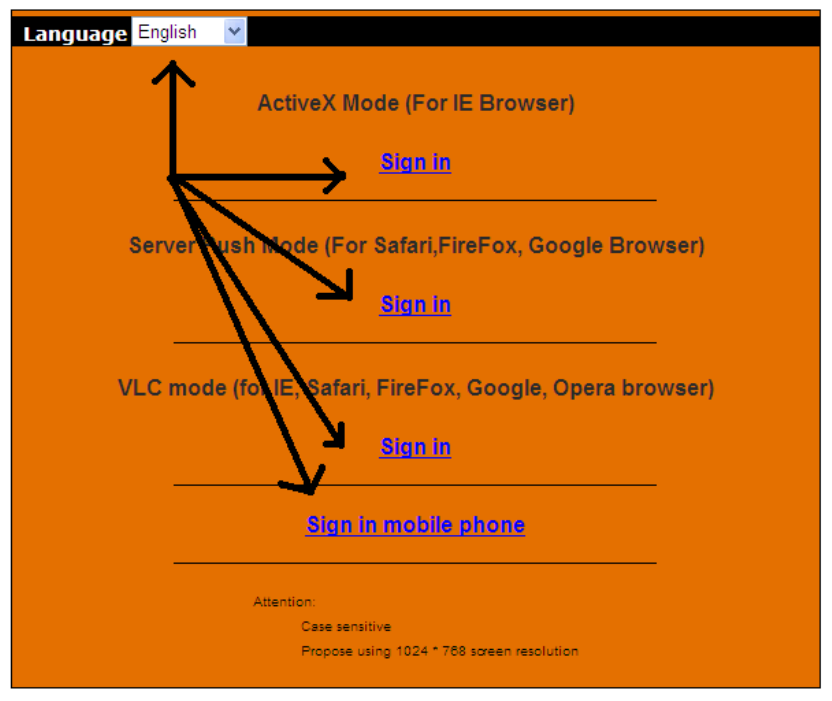
1. Double click the IP address of the IP Camera listed (Figure 1.9). Select your language and
browser you use. Note that IE Browser stands for “Internet Explorer” which is Microsoft Windows
default browser.
ADVISORY: If you are going to use this manual to set up the camera, we suggest you select the English
language, as all images and references in this manual are in English. After installation, you can of course
select your own language to login and view the camera.
Vedere la pagina 14
1 2 ... 10 11 12 13 14 15 16 17 18 19 20 ... 76 77

Commenti su questo manuale

Nessun commento